I have been building links since 2018, first as an agency running campaigns for clients and eventually as the team behind a placement platform. Over that time we have paid for, trialled and abandoned most of the software in this category. These are the twelve that survive on live client work, what each one actually does, and where each one falls down.
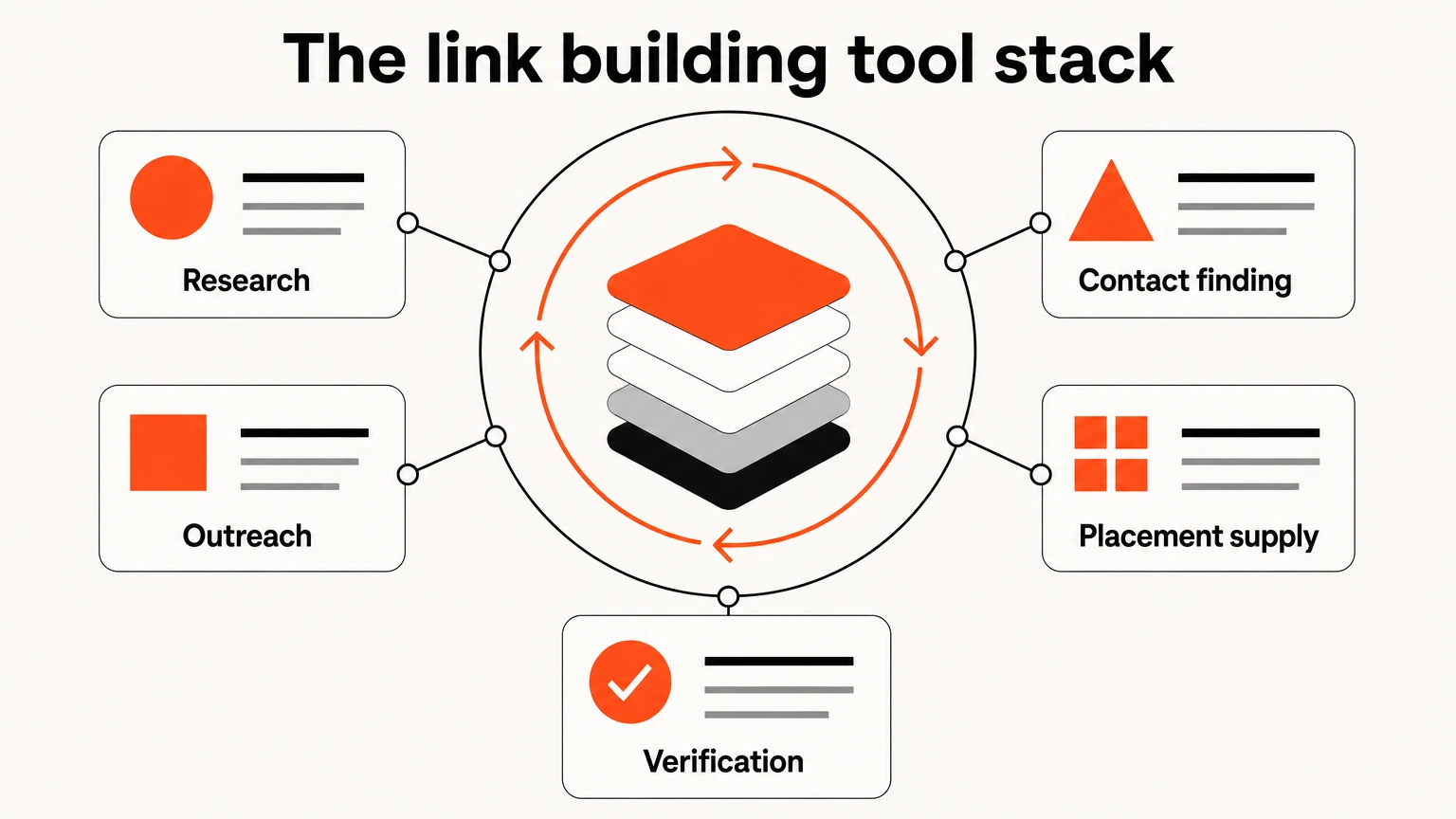
Ahrefs for backlink research, PRWiz for buying and monitoring placements, BuzzStream or Pitchbox for outreach depending on volume, Hunter.io for verified contacts, and Google Google Search Console for verification. A working stack costs $160 to $400 a month and three of the twelve are free at the tier most teams need.
What is a link building tool?
A link building tool is software that handles one stage of earning a backlink. No product covers the whole workflow, which is why almost every serious team runs three or four of them rather than one.
The stages break down cleanly. Research tells you which sites link to competitors and not to you. Prospecting narrows that list to publications worth pitching. Outreach handles the contact and the follow-up. Supply covers publications that accept placements directly. Verification confirms the link went live, stayed live and got indexed.
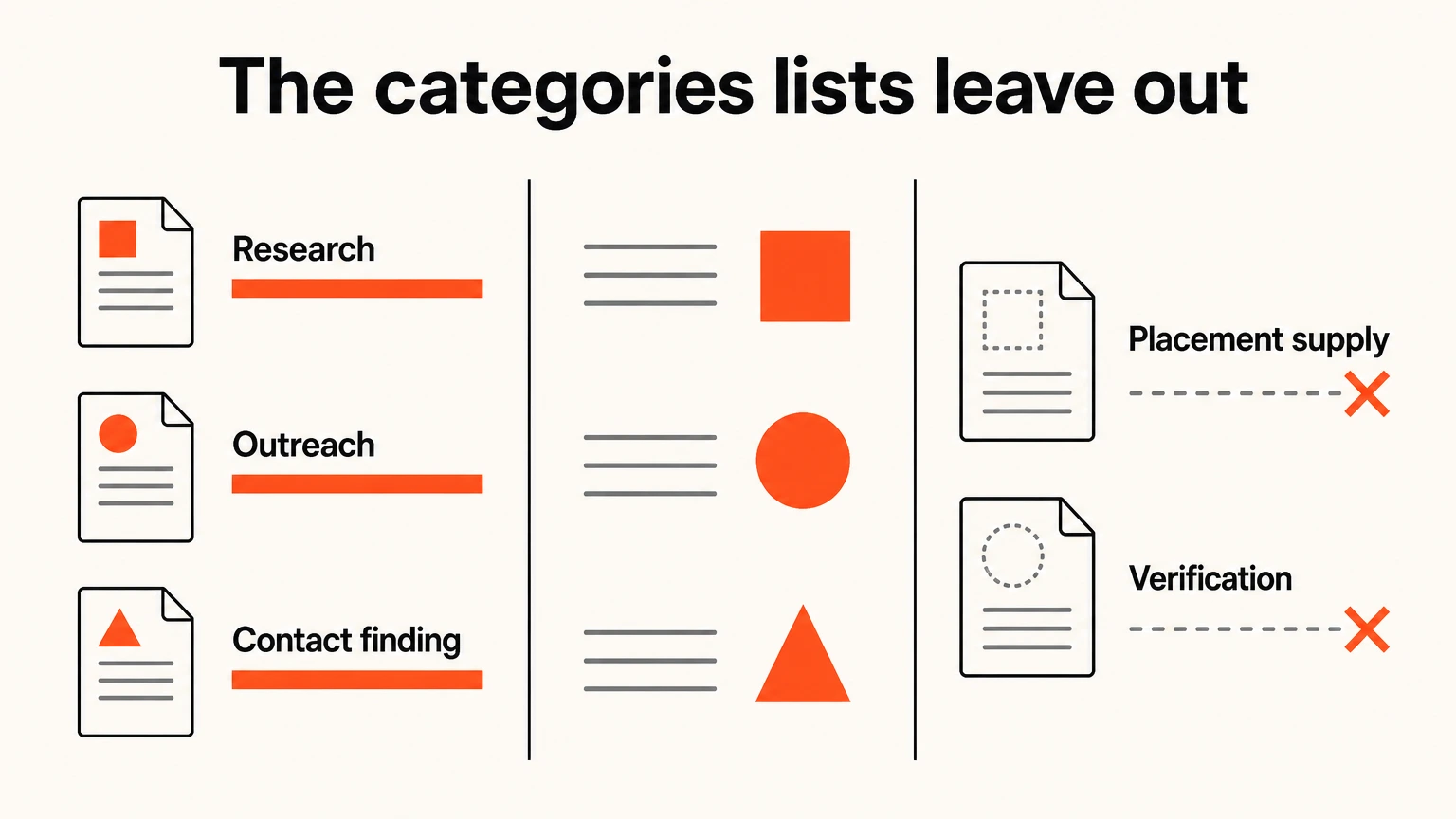
Most published lists cover research, outreach and contact finding, then stop. The two they skip, supply and verification, are where most of the money in this discipline gets wasted.
What to look for in a link building tool
Seven criteria separate a tool that changes outcomes from one that changes how busy you feel.
Index size and freshness
How much of the web the tool has actually crawled, and how recently. A stale index sends you pitching publications that stopped publishing two years ago.
Prospect discovery and filtering
Whether you can narrow a list by the signals that predict a placement, real traffic and topical fit, rather than by Domain Rating alone.
Outreach and personalization
Whether the tool helps you send something an editor will read, or simply helps you send more of the same thing faster.
Contact data accuracy
Bounce rates compound. A tool that returns plausible but dead addresses will quietly damage your sending domain.
Verification after placement
Whether anything tells you the link went live, stayed live and got indexed. Most tools stop at the send.
Team and client workflow
Permissions, project scoping and reporting you can forward. Irrelevant solo, decisive at three clients.
Price against actual usage
Almost every tool here is priced by credits or seats. The sticker price and the real cost diverge fast.
How we selected these tools
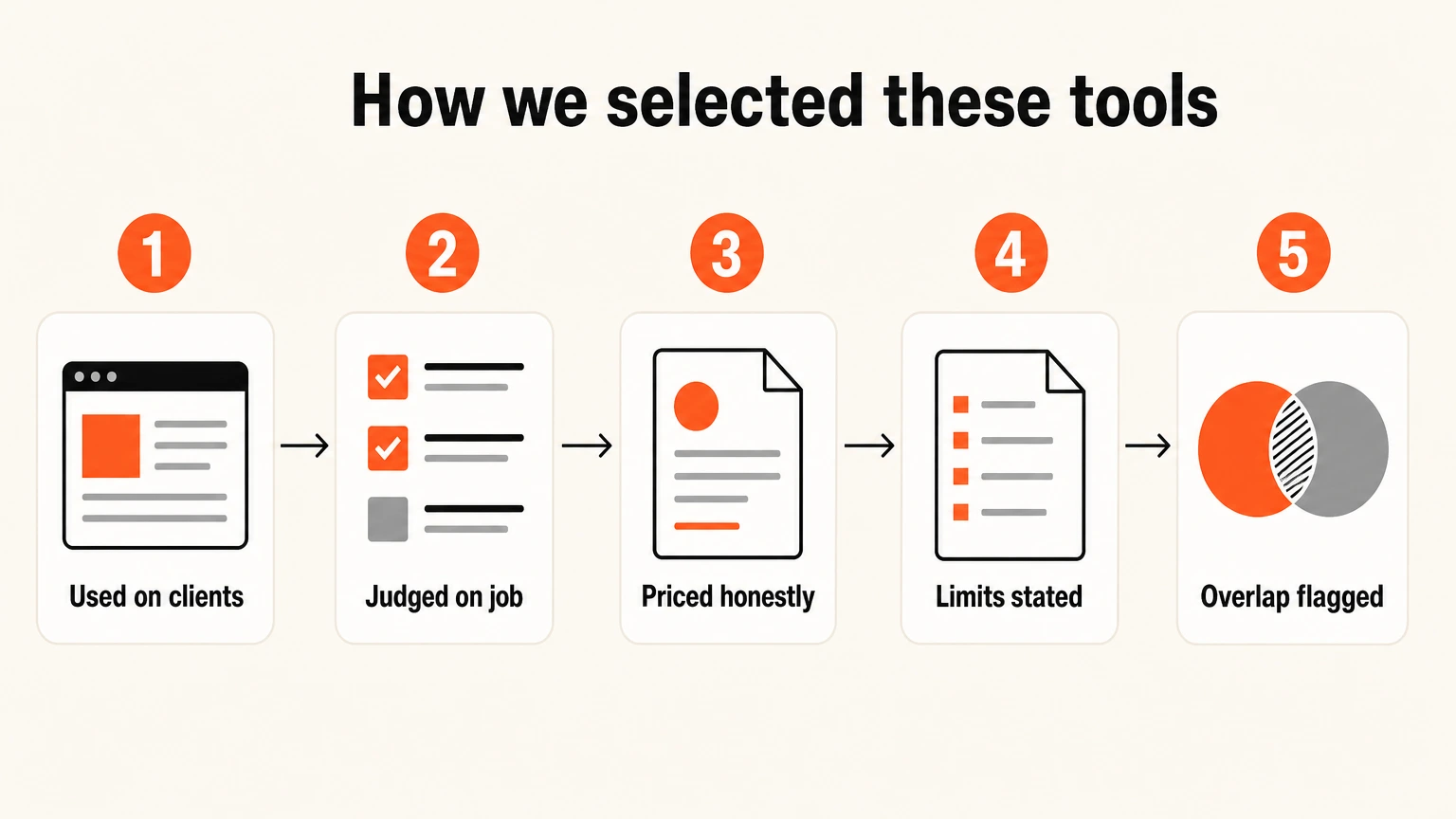
- Used on live client work. Every tool listed runs or has run on paid client campaigns. Nothing here was assessed from a feature page.
- Judged on the job it claims. A monitoring tool is judged on monitoring, not on having a weak keyword module bolted to it.
- Priced honestly. Listed at the tier you would actually need, not the headline entry price that excludes what you came for.
- Limits stated plainly. Every entry carries the constraints we have hit ourselves. A tool with no drawbacks section has not been used.
- Overlap flagged. Where two tools do the same job we say so, because buying both is the commonest way to overspend here.
PRWiz at number two is our own product, built by this agency in 2018 and now run by a separate team. It leads the category this article argues is missing, which is convenient for us, so the case for why that category exists is made above and you can judge it independently. Everything else here we pay for at list price like anyone else. The assessments come from running these tools on live client campaigns rather than from trials or feature comparisons, which is why several entries name limits you will not find on a vendor's site, and why three well-reviewed products are absent: we tried them and stopped paying.
Summary table: the 12 best link building tools
| Tool | Category | Best for | Starting price | Free tier |
|---|---|---|---|---|
| Ahrefs | Backlink research | backlink analysis and competitor research | From $129/mo | Webmaster Tools for your own site |
| PRWiz | Marketplace and platform | buying placements and monitoring them afterwards | Free to browse, from $29 per placement | Full marketplace, AI Article Search, monitoring on every order |
| Semrush | All-in-one suite | all-in-one if you want a single subscription | From $140/mo | 10 requests per day |
| Pitchbox | Outreach CRM | outreach automation at agency volume | From ~$165/mo | Demo only |
| BuzzStream | Outreach CRM | relationship-led outreach on a small team | From ~$29/mo | 14-day trial |
| Respona | Outreach CRM | digital PR and journalist outreach | From ~$99/mo | 14-day trial |
| Hunter.io | Contact finding | finding and verifying editor emails | Free tier, from ~$34/mo | 25 searches and 50 verifications monthly |
| Google Search Console | Verification | free source of truth on indexed links | Free | Everything |
| Qwoted and journalist requests | Earned coverage | links on publications that sell nothing | Free tier, paid from ~$99/mo | Qwoted free, SoS, Help a B2B Writer |
| Majestic | Backlink research | historical link data and trust metrics | From ~$50/mo | Limited site explorer |
| Linkody | Monitoring | standalone backlink monitoring on a budget | From ~$14.90/mo | 30-day trial |
| BuzzSumo | Prospecting | content-driven link prospecting | From ~$199/mo | Limited searches |
The 12 best link building tools in 2026
1. Ahrefs: Best for backlink analysis and competitor research
| Category | Backlink research |
|---|---|
| Starting price | From $129/mo |
| Free tier | Webmaster Tools for your own site |
| User rating | 4.5 / 5 on G2 |
| Best for | backlink analysis and competitor research |
Overview
Ahrefs is the tool I would keep if I could only keep one, and the reason comes down to a single feature rather than the suite around it. Link Intersect takes up to ten competitor domains and returns every site that links to them but not to you. That output is not a starting point for a campaign, it is the campaign. I have opened a new client account, run that one query, and had a defensible ninety-day target list inside an hour.
What makes that possible is the index underneath. Ahrefs crawls more of the web more often than anyone else in this category, and the freshness matters more than the raw size: a target list built on eighteen-month-old data sends you pitching publications that stopped publishing. Site Explorer gives you referring domains, anchor distribution and the history of when links appeared and disappeared, which is how you tell a site that earns links from one that bought a batch in 2023 and has been coasting since.
The two features people underuse are Content Explorer and the broken link reports. Content Explorer searches the body text of the pages Ahrefs has crawled, which lets you find every article in your category that already mentions a competitor without linking to them. The broken link report on a competitor domain surfaces their dead pages, and every site still linking to a 404 is a warm outreach target with a specific, useful reason to hear from you.
Key features
- Link Intersect for competitor gap analysis across up to ten domains
- Site Explorer with referring domains, anchor distribution and link history
- Content Explorer for finding linkable assets and unlinked mentions
- Broken Link Checker on any competitor domain
- Batch Analysis for scoring up to 200 URLs at once
Pros and cons
Pros
- Largest and freshest backlink index of any tool here
- Link Intersect has no genuine equivalent elsewhere
- Data refreshes fast enough to trust for live outreach
- Referring domain filters are the most granular available
Cons
- Credit limits bite quickly once two people prospect on one seat
- No outreach or CRM layer at all, so you will need a second tool
- Domain Rating is Ahrefs' own estimate and the industry treats it as objective
- No meaningful free tier beyond your own verified site
Pricing
Lite $129/mo, Standard $249/mo, Advanced $449/mo. Lite covers most in-house needs. Standard adds historical data and the content tools, and is where agencies usually land.
My verdict
Buy this first. If your budget only stretches to one paid tool, it is this one, and everything else on this list is optional by comparison.
2. PRWiz: Best for buying placements and monitoring them afterwards
| Category | Marketplace and platform |
|---|---|
| Starting price | Free to browse, from $29 per placement |
| Free tier | Full marketplace, AI Article Search, monitoring on every order |
| User rating | 5.0 / 5 from 17+ verified reviews |
| Best for | buying placements and monitoring them afterwards |
Overview
PRWiz is ours, built by this agency in 2018 because the buying side of link building was so opaque that we ended up making the alternative. Filing it as a marketplace undersells what it does: the software layer around the purchase is the part I would defend hardest, and most of it costs nothing to use.
The backlink monitor is the piece I would recommend even to someone buying their placements elsewhere. Every link is re-tested daily against four questions: is it still live, is the anchor still what was agreed, has a rel attribute appeared, and is the page still in Google's index. Alerts arrive by email and in-app the day something changes.
The failure it catches most often is one almost nobody checks for. A publisher accepts a placement and publishes it dofollow. Four months later they run a site-wide plugin update that adds rel="sponsored" to every external link. Nobody tells you, nothing in your reporting changes, and a screenshot still looks correct. The link is passing nothing. A daily automated check surfaces that the next morning; a manual crawl surfaces it whenever you next happen to run one, which for most teams is never.
The index check matters for the same reason. A page Google never indexed passed nothing, and no vendor report distinguishes between a live link and a counted one. For comparison, Ahrefs requires the $249 Standard plan before it will track broken and lost backlinks, and dedicated monitors like Linkody start around $15 a month. Here it is included on every order.
AI Article Search is the newer piece and there is genuinely nothing else like it. It indexes 2.4M+ articles across the publisher network and lets you search by keyword, returning pages that are already ranking for that term with live SERP positions pulled from DataForSEO. You choose the article rather than the domain, then buy an insertion into it. Finding good insertion targets manually takes three to four hours per keyword and two to three weeks to placement; this takes about thirty seconds and 24 to 72 hours.
The rest is agency plumbing that stops being boring the moment you run more than two clients. A blacklist manager blocks competitor and already-used domains across every project at once, so no budget lands twice on the same site. Projects and permissions stop a junior spending the wrong client's money. Average Domain Rating across the catalog is 62 and the twelve-month link retention rate is 99%.
Key features
- Backlink monitor re-tests every link daily for live status, anchor text and Google index state
- Email and in-app alerts the day a link drops, turns nofollow or leaves the index
- AI Article Search across 2.4M+ articles with live SERP positions from DataForSEO
- Publisher database of 6,000+ vetted sites with DA, DR, traffic, referring domains and spam score
- Blacklist manager blocking competitor and used domains across every client project
- Projects, granular permissions and a shared wallet for agency teams
Pros and cons
Pros
- Daily monitoring with index-status checking, included free on every order
- AI Article Search finds pages already ranking so you buy the page, not the domain
- Exact domain and all eight metrics visible before you pay
- No minimum, no retainer, no contract
- Blacklist works across projects, which stops duplicate placements between clients
Cons
- The monitor tracks links bought through it, so it is not a whole-profile auditor like Ahrefs
- Supply and verification, not strategy. It will not decide which pages need links
- 6,000+ publishers is smaller than the bulk marketplaces, deliberately
- No keyword research or rank tracking, so it sits alongside a suite rather than replacing one
Pricing
Free to browse the entire catalog and to run AI Article Search. Placements from $29. Monitoring, projects and the blacklist are included at no cost on every plan.
My verdict
The monitoring alone is worth an account even if you buy placements elsewhere. Ahrefs makes you reach the $249 tier before it tracks lost backlinks; Linkody starts around $20 a month. This is free.
3. Semrush: Best all-in-one if you want a single subscription
| Category | All-in-one suite |
|---|---|
| Starting price | From $140/mo |
| Free tier | 10 requests per day |
| User rating | 4.5 / 5 on G2 |
| Best for | all-in-one if you want a single subscription |
Overview
Semrush is the strongest single-subscription option in this category, and the honest way to describe it is that it does two jobs adequately where the specialists each do one job well. Backlink analytics, a Link Building Tool that prospects and sends outreach, and the wider SEO suite sit in one seat. Ahrefs beats it on index depth and Pitchbox beats it on outreach sequencing, but neither of those does the other thing at all.
Backlink Gap is the closest competitor to Link Intersect and it works well enough for most campaigns, comparing up to five domains at once. Where Semrush pulls genuinely ahead is Backlink Audit: its toxicity scoring is better than Ahrefs at flagging the obvious networks, which is useful when you inherit a profile with a history nobody can explain. The Link Building Tool then lets you push prospects straight into an outreach queue without exporting to a CRM, which removes a real friction point for a small team.
The catch is pricing structure rather than headline price. Additional users are billed separately, projects are capped by tier, and the API sits behind another jump. Teams that start on Pro at $140 routinely find themselves on Guru at $250 within a quarter. If you already run Ahrefs, the overlap is not worth paying for twice.
Key features
- Backlink Gap for competitor comparison across five domains
- Link Building Tool with built-in prospecting and email outreach
- Backlink Audit with toxicity scoring and disavow file export
- Backlink Analytics with authority score and anchor breakdown
- Full keyword, rank tracking and site audit suite alongside
Pros and cons
Pros
- Prospecting, outreach and tracking in one subscription
- Backlink Gap is a competent Link Intersect alternative
- Toxicity detection is better than Ahrefs at flagging obvious networks
- The wider suite genuinely reduces tool sprawl
Cons
- Backlink index is shallower than Ahrefs, noticeably in smaller niches
- The outreach module is basic beside a real CRM
- Costs escalate fast once you add users, projects and the API
- Authority Score is yet another proprietary metric to argue about
Pricing
Pro $140/mo, Guru $250/mo, Business $500/mo. Extra users are charged separately, which is the line item that surprises teams.
My verdict
Pick Semrush over Ahrefs only if one invoice matters more than index depth. If you already run Ahrefs, the overlap is not worth paying twice for.
4. Pitchbox: Best for outreach automation at agency volume
| Category | Outreach CRM |
|---|---|
| Starting price | From ~$165/mo |
| Free tier | Demo only |
| User rating | 4.7 / 5 on G2 |
| Best for | outreach automation at agency volume |
Overview
Pitchbox is built for scale and priced accordingly, which makes it either obviously correct or obviously wrong depending on your volume. Above roughly two hundred pitches a month it pays for itself quickly. Below fifty it is a large amount of software to manage a small amount of email, and we did not buy it until we crossed that line ourselves.
What you are paying for is sequencing and memory at volume. Follow-up chains fire automatically and stop the moment someone replies, which sounds trivial until you have manually chased four hundred prospects and accidentally sent a third follow-up to somebody who already said yes. Native integrations with Ahrefs, Moz, Majestic and Semrush mean prospect lists arrive with metrics attached rather than requiring an export-import cycle for every campaign.
The reporting is the underrated part for agencies. Campaign performance breaks down by outreach rep and by target segment, which turns "our reply rate is low" into "this template on this segment is failing," and that is a fixable problem. Worth stating plainly though: automation multiplies whatever you already have. A weak list and a generic pitch will simply fail faster and at greater expense.
Key features
- Automated multi-step follow-up sequences with reply detection
- Native integrations with Ahrefs, Moz, Majestic and Semrush
- Prospecting workflows that pull and score targets automatically
- Team performance reporting by campaign and by outreach rep
- Custom fields and templates for personalization at volume
Pros and cons
Pros
- The strongest follow-up sequencing in the category
- Integrations remove most manual list building
- Reporting is genuinely client-ready without editing
- Handles multiple campaigns and seats cleanly
Cons
- Priced and designed for a volume most in-house teams never reach
- Real setup time before it earns anything back
- Automation makes weak outreach fail faster rather than work
- No public pricing, which slows procurement
Pricing
Quoted rather than published, typically starting around $165/mo and rising with seats and campaign volume. Expect an annual commitment at the agency tier.
My verdict
The right purchase above two hundred pitches a month and the wrong one below fifty. Buy BuzzStream instead until you are certain which side of that line you sit on.
5. BuzzStream: Best for relationship-led outreach on a small team
| Category | Outreach CRM |
|---|---|
| Starting price | From ~$29/mo |
| Free tier | 14-day trial |
| User rating | 4.2 / 5 on G2 |
| Best for | relationship-led outreach on a small team |
Overview
Where Pitchbox optimizes for throughput, BuzzStream optimizes for memory, and for a small team that is usually the more valuable property. It holds the full history of who you spoke to, what they published, when, and what the outcome was. That record is precisely what makes the second placement on a publication easier than the first, and the third easier still.
The browser extension is the fastest prospect capture I have used anywhere. You are reading an article, you decide the publication is worth pitching, and one click pulls the domain, the author and any discoverable contact details into a project. Over a week that removes a genuine amount of friction from the research half of the job.
It shows its age in places. The interface has not been meaningfully rethought in years, the prospecting side is noticeably weaker than the CRM side, and reporting needs cleaning up before a client sees it. But at $29 for a single user it is the best value on this list, and for a team of one to three it does the job Pitchbox does at a fifth of the cost.
Key features
- Contact and conversation history attached to every prospect
- Browser extension that captures prospects while you browse
- Team inbox with assignment and duplicate detection
- Link monitoring on placements you have already earned
- Templates with merge fields and simple sequencing
Pros and cons
Pros
- Excellent relationship and contact history
- Genuinely affordable entry tier at $29
- Browser extension is the fastest prospect capture here
- Duplicate detection prevents the embarrassing double pitch
Cons
- Less automation than Pitchbox by a wide margin
- Interface has aged visibly
- Prospecting is weaker than the CRM side
- Reporting needs work before a client sees it
Pricing
Starter $29/mo for one user, Growth $99/mo, Professional $299/mo, Custom above. Seats and contact volume drive the tier.
My verdict
The best value on this list for a team of one to three. Start here, and move to Pitchbox only when the volume genuinely forces it.
6. Respona: Best for digital PR and journalist outreach
| Category | Outreach CRM |
|---|---|
| Starting price | From ~$99/mo |
| Free tier | 14-day trial |
| User rating | 4.7 / 5 on G2 |
| Best for | digital PR and journalist outreach |
Overview
Respona is the most modern of the outreach tools here and the only one that feels designed for pitching journalists rather than trading links. That distinction shows up everywhere in the product: campaign templates for digital PR, HARO responses and link reclamation rather than generic guest post sequences.
The AI-assisted personalization is the headline feature and it genuinely helps in a specific band of volume. At ten pitches a week you should write them yourself. At five hundred nothing personalizes convincingly. Between those, where a template gets ignored and full manual research does not scale, Respona drafts an opener that references the actual article you are pitching against, and that is usually enough to earn the read. It still needs a human eye before sending, because it writes plausible openers rather than good ones.
Contact finding and verification are built in rather than bolted on, which offsets the price against a separate Hunter.io seat. If your link building is really digital PR, buy this over Pitchbox. If it is placement outreach at volume, the reverse.
Key features
- AI-assisted personalization drawing on the target article
- Built-in article and podcast search for finding pitch targets
- Email finder and verification included rather than bolted on
- Automated follow-ups with reply and bounce handling
- Campaign templates for digital PR, HARO and link reclamation
Pros and cons
Pros
- Built for digital PR rather than link exchange
- Contact finding included, so no separate Hunter.io seat needed
- Cleanest onboarding of the three outreach tools
- Personalization holds up at moderate volume
Cons
- Smaller contact database than Pitchbox
- AI openers still need a human read before sending
- Mid-market pricing with no permanent free tier
- Less suited to high-volume link prospecting
Pricing
Starter $99/mo, Unlimited $399/mo. Both include email finding credits, which offsets the price against buying a verifier separately.
My verdict
If your link building is really digital PR, buy this over Pitchbox. If it is placement outreach at volume, buy Pitchbox.
7. Hunter.io: Best for finding and verifying editor emails
| Category | Contact finding |
|---|---|
| Starting price | Free tier, from ~$34/mo |
| Free tier | 25 searches and 50 verifications monthly |
| User rating | 4.4 / 5 on G2 |
| Best for | finding and verifying editor emails |
Overview
Hunter.io does one job and does it reliably: it finds the email address behind a domain and tells you whether that address will bounce. That sounds unglamorous next to the outreach platforms, and it protects something more valuable than any of them.
Deliverability is the invisible killer of outreach campaigns. Send to enough dead addresses and your bounce rate climbs, your sender reputation drops, and the good pitches stop arriving in inboxes at all. Nothing in your reporting will show you this happening. You will simply notice reply rates falling and conclude the pitch is wrong. Verification before sending costs pennies and prevents a problem that takes months to recover from.
The honest limitation is coverage. Hunter is excellent on established publications with structured contact pages and thins out noticeably on small independent blogs, which is exactly where the interesting placements often are. The free tier covers 25 searches a month, which is enough for a small campaign, and most in-house teams never need to upgrade.
Key features
- Domain Search returning every known address on a publication
- Email Verifier with confidence scoring before you send
- Bulk tasks for lists of up to 50,000
- Chrome extension for on-page lookups
- API for pipeline automation
Pros and cons
Pros
- Verification genuinely protects sender reputation
- Usable free tier for low volume
- Simple, well-documented API
- Confidence scores are honest rather than optimistic
Cons
- Coverage thins on small independent publishers, which is where the good placements are
- Credit model penalizes bulk lookups
- Finds an address, not necessarily the right person
- Overlaps with Respona if you already run that
Pricing
Free for 25 searches monthly. Starter $34/mo, Growth $104/mo, Business $349/mo. Credits reset monthly and do not roll over.
My verdict
Buy the free tier first and only upgrade when you hit the ceiling. Most in-house teams never do.
8. Google Search Console: Best free source of truth on indexed links
| Category | Verification |
|---|---|
| Starting price | Free |
| Free tier | Everything |
| User rating | Not rated commercially |
| Best for | free source of truth on indexed links |
Overview
Every paid tool in this article estimates. Search Console reports what Google actually did, which makes it the only place on earth you can confirm that a placement you paid for was counted at all.
That distinction has cost our clients real money before we made it a standard check. On one audit of an inherited campaign, roughly a fifth of the previous vendor's reported placements had never entered Google's index. Every one of them was live. Every one appeared in the monthly report as a delivered link. None of them passed anything, and nobody had looked, because no tool in the vendor's stack was capable of telling them.
Beyond verification, the Links report gives you anchor text distribution straight from the source rather than from a sample, which is the only trustworthy way to check whether your anchor profile is drifting toward over-optimization. URL Inspection settles indexation arguments in seconds. It lags by a few days and tells you nothing about competitors, so use it as the ledger rather than the research tool.
Key features
- Links report showing top linking sites and target pages
- Anchor text distribution across your whole profile
- Index coverage reporting for the pages receiving links
- URL Inspection for checking a specific placement
- Performance data connecting links to actual query impressions
Pros and cons
Pros
- The only authoritative record of what Google counted
- Free with no seat, credit or project limits
- Anchor distribution is straight from the source rather than sampled
- URL Inspection settles indexation arguments in seconds
Cons
- Lags by several days on new links
- No competitor data whatsoever
- Sampled and awkward to export at volume
- No alerting, so you have to remember to look
Pricing
Free, permanently, for any verified property.
My verdict
Not optional. If a vendor reports a placement and Search Console has never seen it, you have your answer.
9. Qwoted and the journalist request stack: Best for earning links you cannot buy
| Category | Earned coverage |
|---|---|
| Starting price | Free tier, paid from ~$99/mo |
| Free tier | Qwoted free plan, Source of Sources, Help a B2B Writer |
| User rating | 4.6 / 5 on G2 (Qwoted) |
| Best for | Editorial links on publications that sell nothing at any price |
Overview
This is the one category on the list that produces links no marketplace can sell you at any price. A journalist needs an expert quote on deadline, you supply one worth publishing, and you get credited with a link on a publication that would never have taken a cold pitch. It is also the only free channel here that reliably lands tier-one coverage.
The category went through upheaval worth understanding before you pick a platform. Help a Reporter Out was the default for over a decade until Cision rebranded it Connectively and shut it down on 9 December 2024, taking the most popular free link building channel on the internet offline overnight. Featured.com acquired the HARO brand and relaunched it in April 2025 on the original email model, now with AI content detection and LinkedIn verification to fight the pitch spam that killed the last version. Meanwhile Peter Shankman, who built the original HARO in 2008, launched Source of Sources as a free email digest that mirrors the old workflow almost exactly.
The practical consequence is that no single platform is the answer any more, and anyone telling you to just sign up for one is working from a 2023 playbook. We run three: Source of Sources for free volume, Qwoted for the higher-authority requests and its profile system that lets journalists find you rather than the reverse, and Help a B2B Writer, which is free, B2B-only and has by far the best hit rate per pitch if you sell software. A general platform buries you in requests about skincare and travel insurance; Help a B2B Writer does not.
Two things decide whether this works. Speed, because the first credible response usually wins and an hour late is too late. And having something specific to say, since AI-generated filler is now the majority of what journalists receive and they have become very good at spotting it. There is also a second return that did not exist two years ago: editorial mentions on authoritative domains are among the strongest signals feeding AI search visibility, so a placement earns ranking value and citation value at once.
Key features
- Qwoted free tier covers most journalist requests, with AI matching by expertise
- Expert profiles journalists can search, so opportunities arrive without pitching
- Source of Sources delivers the original HARO email digest format, free
- Help a B2B Writer filters to B2B and software requests only, free
- Featured.com offers curated requests with priority access on paid tiers
- #JournoRequest on X and Bluesky remains the fastest unpaid feed
Pros and cons
Pros
- Produces links on publications that sell no placements at any price
- Genuinely free to start across three of the platforms
- Earned mentions feed AI search visibility as well as rankings
- Help a B2B Writer is unusually well targeted for software companies
Cons
- Low hit rate, roughly one placement per twenty well-written responses
- Needs a real expert to answer, so it does not delegate to a junior
- Deadlines are often same-day, which is hard to staff around
- Platform risk is real: the category leader disappeared once already
Pricing
Qwoted has a free plan covering most requests, with paid tiers from around $99 a month adding priority placement and more categories. Source of Sources and Help a B2B Writer are free. Featured.com runs subscription tiers for curated access. Start free across all three and only pay once you have proved the channel converts for your category.
My verdict
Run this alongside everything else on the list, not instead of it. It is slow, unpredictable and free, which makes it the ideal counterweight to a paid placement budget. Diversify across two or three platforms rather than committing to one, because the history above shows what happens when you build a channel on a single owner's roadmap.
10. Majestic: Best for historical link data and trust metrics
| Category | Backlink research |
|---|---|
| Starting price | From ~$50/mo |
| Free tier | Limited site explorer |
| User rating | 4.3 / 5 on G2 |
| Best for | historical link data and trust metrics |
Overview
Majestic is the specialist choice and rarely anyone's first tool. Trust Flow and Citation Flow were measuring link quality before Domain Rating existed, and the pairing is still the most useful quality signal available because it is two numbers rather than one.
Citation Flow counts link volume. Trust Flow estimates how close those links sit to a set of manually reviewed trusted seed sites. A domain with high Citation Flow and low Trust Flow has many links from places nobody vouches for, which is the statistical signature of purchased authority. Domain Rating collapses both signals into a single number and reports that same domain as strong. When you inherit a site with an unexplained history, or are considering an expired domain, that divergence is the fastest tell available.
The Historic Index reaches back to 2006, deeper than anything else in the category, which matters when you need to know what a domain was doing five years ago rather than five weeks ago. The interface is dated, the Fresh Index is less current than Ahrefs, and there is no outreach or keyword tooling at all. Rent a month when you need it.
Key features
- Trust Flow and Citation Flow as paired quality metrics
- Historic Index reaching back to 2006
- Topical Trust Flow showing subject-level authority
- Clique Hunter for competitor link intersection
- Bulk backlink checking across many domains
Pros and cons
Pros
- Deepest historical index available anywhere
- Trust Flow exposes manufactured authority that DR reports as legitimate
- Topical Trust Flow is genuinely useful for relevance judgment
- Cheaper than the all-in-one suites
Cons
- Narrow: no outreach, no keyword tooling, no rank tracking
- Interface is dated even by this category's standards
- Fresh Index is less current than Ahrefs
- Rarely anyone's first tool
Pricing
Lite $49.99/mo, Pro $99.99/mo, API $399.99/mo. Lite is sufficient for occasional auditing.
My verdict
A second opinion rather than a first tool. Worth a month's subscription when you inherit a domain with a history you cannot explain.
11. Linkody: Best standalone backlink monitoring on a budget
| Category | Monitoring |
|---|---|
| Starting price | From ~$14.90/mo |
| Free tier | 30-day trial |
| User rating | 4.5 / 5 on G2 |
| Best for | standalone backlink monitoring on a budget |
Overview
Linkody is included because monitoring is the step teams skip most often, and if you are not buying placements through a platform that includes it, this is the cheapest dedicated way to stop skipping it.
It checks your links continuously and alerts you when one disappears, turns nofollow or changes anchor. Crucially it covers links from any source, not only ones you bought, which makes it the right answer when your profile is a mix of earned coverage, placements from three different vendors and historic links nobody can account for. The white-label client reporting is genuinely white-label rather than a logo swap on a Linkody-branded page.
The trade-offs are proportional to the price. The index is small compared to the majors, competitor tracking is capped low on entry tiers, and there is essentially no prospecting or research capability. It monitors, and it does that one thing at $14.90 a month, which is roughly a sixteenth of what Ahrefs charges for the tier that includes lost-link tracking.
Key features
- Daily backlink checking with new and lost alerts
- Disavow file management and export
- Google Analytics and Search Console integration
- Automated white-label client reporting
- Competitor backlink monitoring on up to a few domains
Pros and cons
Pros
- Cheapest dedicated monitoring available
- Client reporting is genuinely white-label
- Simple enough to set up in an afternoon
- Covers links from any source, not just ones you bought
Cons
- Small index compared to the majors
- Limited prospecting or research capability
- Competitor tracking is capped low on entry tiers
- Redundant if your marketplace already monitors
Pricing
Webmaster $14.90/mo, Advanced $24.90/mo, Pro $49.90/mo, Agency $99.90/mo. Tiers are set by domains and links tracked.
My verdict
Buy it only if you build links across many sources and none of them monitors for you. Otherwise the free monitoring in a placement platform covers the same job.
12. BuzzSumo: Best for content-driven link prospecting
| Category | Prospecting |
|---|---|
| Starting price | From ~$199/mo |
| Free tier | Limited searches |
| User rating | 4.5 / 5 on G2 |
| Best for | content-driven link prospecting |
Overview
BuzzSumo answers a different question from every other tool in this article. The rest tell you who links to your competitors. BuzzSumo tells you what kind of content earns links in your category at all, which is the question you need answered before a target list is any use.
Content Analyzer surfaces the most-linked and most-shared pieces on any topic over any period, and the pattern that emerges is usually more instructive than any individual result. If every top-linked article in your space is original research and yours is a listicle, you have learned something that no amount of outreach volume will fix. For digital PR planning, where the angle has to exist before the pitching starts, nothing else here does this job.
The journalist and influencer database is the second reason to keep it, letting you filter reporters by the beat they actually cover rather than by the outlet's masthead. Brand monitoring surfaces unlinked mentions, which are the cheapest links available anywhere: someone has already named you, and you are only asking them to make it a link. Expensive for how often most teams open it, so rent it per campaign.
Key features
- Content Analyzer showing top-shared and top-linked content by topic
- Journalist and influencer database with beat filtering
- Brand monitoring for unlinked mention reclamation
- Content Discovery for trending and evergreen angles
- Question Analyzer pulling real questions from forums
Pros and cons
Pros
- The best tool here for finding an angle rather than a target
- Journalist database is genuinely useful for digital PR
- Unlinked mention alerts produce the cheapest links available
- Historical data goes back far enough to spot durable patterns
Cons
- Expensive relative to how often most teams open it
- Not a backlink tool in the conventional sense
- Share data is less meaningful than it was a decade ago
- Overkill for straightforward placement outreach
Pricing
Content Creation $199/mo, PR & Comms $299/mo, Suite $499/mo. The PR tier is the one worth having if you are pitching journalists.
My verdict
Buy it for a quarter when planning a digital PR campaign, then cancel. Continuous subscription is rarely justified unless PR is your main channel.
The category most tool lists leave out
Run through the published lists on this topic and you will find the same three categories every time: research, outreach, contact finding. Ahrefs, Pitchbox, Hunter.io, repeated in a different order.
Two categories are almost always missing. Placement supply answers which publications will actually accept a link and at what price. Verification answers whether the link you paid for is live and indexed.
Here is how it fails in practice. Link Intersect returns two hundred sites linking to your competitors. Your outreach tool sends two hundred emails. Twelve reply, nine want payment, and nothing in your stack tells you which of those nine are real publications and which are networks with good branding. We lost money in that gap repeatedly in the early years, which is ultimately why we built a platform to close it.
My best guess at why it goes unnamed: tool lists are mostly written by software companies, and software companies list software. Placement supply sits between a database and a marketplace, so it does not fit the format, and a genuine bottleneck goes unmentioned.
Which link building tools to buy first
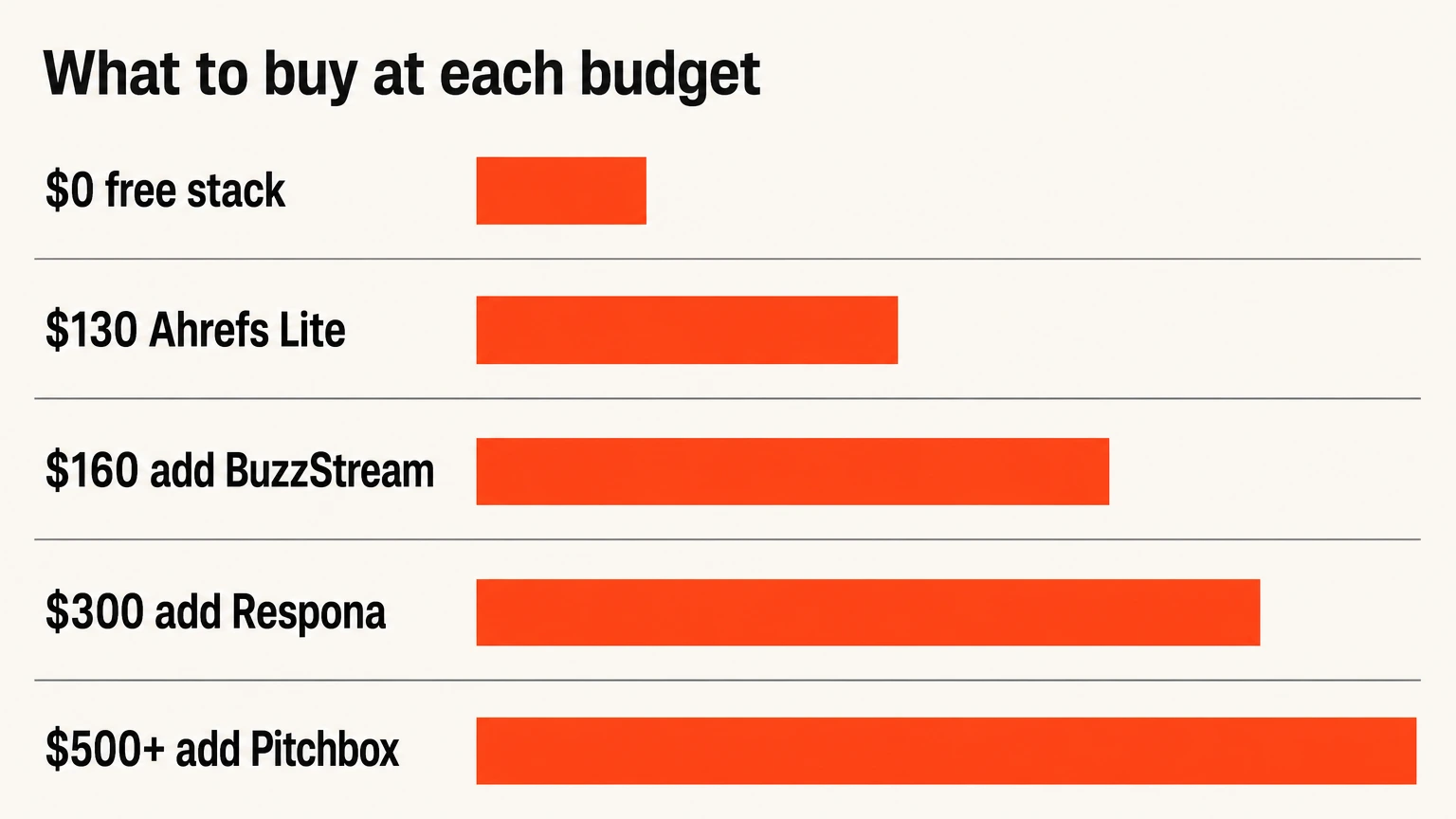
| Budget | Buy | Why at this point |
|---|---|---|
| $0 | Search Console, Hunter.io free tier, Source of Sources, browse PRWiz | Verification, 25 monthly lookups and full visibility of what supply exists. Free covers more of this workflow than most people expect. |
| ~$130/mo | Add Ahrefs Lite | Link Intersect. The one purchase that changes outcomes rather than efficiency. |
| ~$160/mo | Add BuzzStream Starter | Relationship history at $29. Enough structure for a one to three person team. |
| ~$300/mo | Upgrade Hunter.io, add Respona if pitching journalists | Justified past roughly fifty pitches a month, not before. |
| $500/mo+ | Add Pitchbox, rent Majestic or BuzzSumo per project | Agency volume. Below this the automation costs more time than it saves. |
What changes for SaaS link building
We run SaaS campaigns almost exclusively, and the tooling barely changes. What changes completely is the target list.
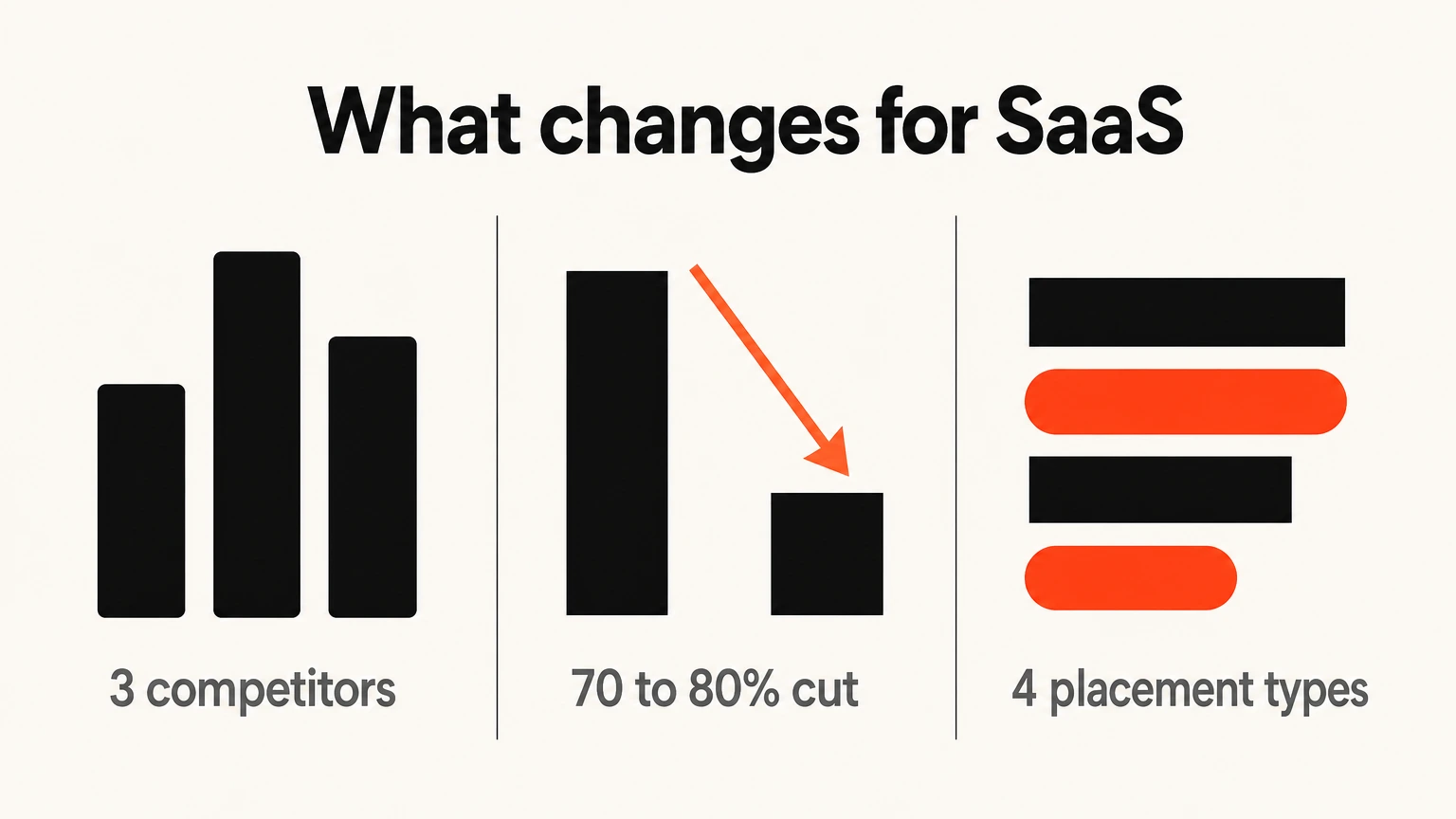
For a software company, general industry blogs do very little. The placements that move rankings and get you named in AI answers are narrower: category roundups, comparison and alternative pages, integration partner sites, and review platforms. No niche filter in any research tool surfaces those, because the connection is commercial rather than topical.
The method we use: take the three closest competitors, run Link Intersect, then manually discard everything that is not a publication your buyer would plausibly read before a demo. On a typical SaaS account that removes seventy to eighty percent of the list. What remains is small, expensive and worth having.
That filtering step is judgment rather than software, which is the honest reason our SaaS link building service is priced the way it is. You are not paying for tool access.
Which link building tool is best for you?
| If you need to | Use | Why |
|---|---|---|
| Research competitor backlinks | Ahrefs | Link Intersect has no equivalent. Buy this seat first. |
| Buy placements safely | PRWiz | All eight metrics and the exact domain visible before payment, from $29. |
| Monitor links afterwards | PRWiz or Linkody | Free on every order, or from $14.90 standalone. Ahrefs wants $249 for the same job. |
| Run outreach at agency volume | Pitchbox | Sequencing and reporting that hold up above two hundred pitches a month. |
| Run outreach on a small team | BuzzStream | $29 and better at remembering relationships than automating them. |
| Pitch journalists | Respona | The only CRM here built for digital PR rather than link trading. |
| Find a campaign angle | BuzzSumo | Answers what earns links in your space, which no other tool here does. |
| Audit an inherited domain | Majestic | Trust Flow exposes manufactured authority that Domain Rating reports as real. |
| Monitor placements continuously | PRWiz or Linkody | Daily automated checks on status, anchor, rel and index state. Free on every order, or from $14.90 standalone. |
| Earn tier-one coverage free | Qwoted + Help a B2B Writer | The one link type no marketplace can sell you. Slow, unpredictable, and free. |
| Run everything on one invoice | Semrush | Adequate at research and outreach both, if simplicity beats depth. |
If you would rather buy the outcome than the software, the link building services comparison covers ten providers. For what placements actually cost, see the link building cost guide.
Frequently asked questions
What is a link building tool?
What are the best link building tools in 2026?
Which link building tool should I buy first?
How much does a link building tool stack cost?
Are there any good free link building tools?
Do I need a backlink monitoring tool?
What is the difference between a link building tool and a link building service?
Do these tools work for SaaS link building?
Can AI tools replace manual link building?

Mohammad Qaiser
Working in SEO since 2010, founder of Authority Magnet since 2018, and campaign lead on every case study the agency publishes. Also built PRWiz, where this work gets tested on our own software before it reaches a client.
Work with us